Secure Your Firefox with Apex VPN
Download ApexQuick VPN extension setup on any desktop with Firefox.
By installing ApexGuard, you agree to
our Terms of Service and Privacy Policy.









Why Download Apex VPN?
Encryption Without Compromise
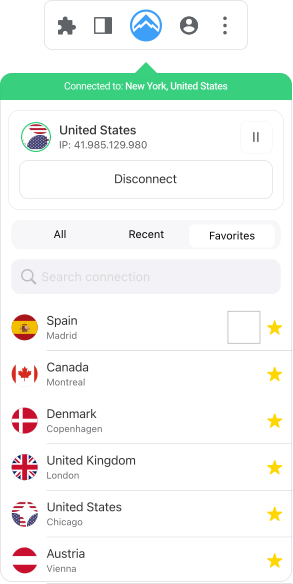
Tailored for Firefox, Apex VPN secures downloads, streaming, and P2P sharing via proprietary servers. Free proxy add-ons log data—we erase it, ensuring anonymity for activists, travelers, and remote workers alike.
Tailored for Firefox, Apex VPN secures downloads, streaming, and P2P sharing via proprietary servers. Free proxy add-ons log data—we erase it, ensuring anonymity for activists, travelers, and remote workers alike.
Download ApexApex VPN
-
Your Secrets Stay Safe
With Apex VPN on Firefox, your privacy is maintained through a clear no-logs policy.
-
Fortified Data
With advanced encryption, your data is encrypted using secure protocols, ensuring a safe online environment.
-
Data Freedom
The world is your oyster with Apex. Enjoy unrestricted browsing, streaming, and downloading on Firefox.
-
Stability Forever
Apex VPN’s optimized servers provide a stable, secure connection on the Firefox browser.
-
Global Access
With a server network that spans the globe, Apex ensures access to geo-restricted content.
Free VPN
-
Your Data for Sale
May use data tracking to generate revenue, putting your online privacy at risk.
-
Exposed to the World
The use of outdated encryption methods can compromise your online security.
-
Throttled and Slow
Throttling can significantly slow down your internet speeds, causing buffering and lag.
-
Connectivity Woes
Connection issues can be frustrating, especially when you need a stable internet connection.
-
Restricted Reach
Free VPNs often lack the resources to invest in a global server network, limiting user access.
You may still be wondering
Frequently Asked Questions
Why do I need a VPN for Firefox?
Firefox alone can’t bypass ISP throttling or regional blocks. If you frequently use public Wi-Fi, Apex VPN is essential. It masks your IP and encrypts traffic, letting you torrent, stream, or work remotely without restrictions, helping ensure all of your online activities are private and secure.
How does Swiss jurisdiction benefit my privacy?
Switzerland’s strong privacy laws make it one of the best jurisdictions for data protection as Switzerland isn’t part of any global surveillance alliance. This means your info is shielded from global surveillance and unauthorized snooping. It’s why Switzerland is a go-to spot for privacy-focused services.
Will Apex affect my browsing speed?
No, Apex is built to keep you secure without putting the brakes on your browsing. It uses top-notch networks and fine-tunes server connections to make sure you get fast and reliable performance. So, you get all the benefits of high-level encryption without feeling like you’re stuck in the slow lane.
Can I use Apex on other browsers and devices?
Absolutely, Apex isn’t just for Firefox. It’s designed to work across different devices and browsers, so whether you’re on Chrome, Edge, or using a mobile device, Apex has got you covered. It’s all about giving you the flexibility to stay protected no matter where you’re browsing from.
How secure is Apex against cyber threats?
Apex takes your online safety seriously. It uses cutting-edge encryption to keep your data safe from hackers, phishing scams, and malware. With secure servers and regular updates, Apex is always on guard, making sure your personal info stays out of the wrong hands.

Get Apex VPN
Select the Apex VPN subscription plan that best suits your needs.
Add the Extension
Search for ‘ApexGuard’ in the Firefox Add-ons and add it to your browser.
Connect and Browse
Log in to your Apex VPN account, select a server, and click ‘Connect’, to browse the web with added security and privacy.
Apexguard System Requirements by Platform