Protect Chrome with Apex VPN
Download ApexQuick VPN extension setup on any desktop with Google Chrome.
By installing ApexGuard, you agree to
our Terms of Service and Privacy Policy.
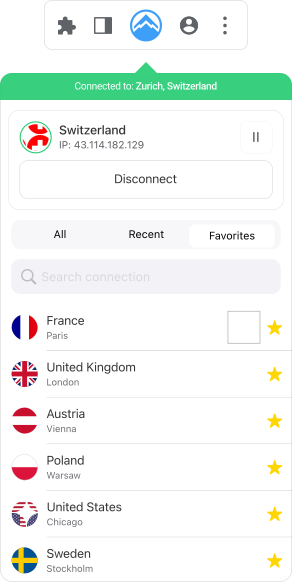









Why Download Apex VPN?
Chrome’s Privacy Power-Up
Skip risky free VPNs. Apex’s extension uses owned servers and AES-256 encryption to anonymize YouTube, Gmail, and Drive. Swiss jurisdiction means even governments can’t access your data.
Skip risky free VPNs. Apex’s extension uses owned servers and AES-256 encryption to anonymize YouTube, Gmail, and Drive. Swiss jurisdiction means even governments can’t access your data.
Download ApexApex VPN
-
Your Secrets – Kept Safe
Apex VPN prioritizes user trust, adhering to a transparent no-logs policy on Chrome.
-
Turbocharged Browsing
Experience turbocharged browsing with high-speed connections on Apex VPN’s high-speed network.
-
Fortified Data
With advanced 256-bit AES encryption, your data is securely protected.
-
The World at Your Fingertips
Apex VPN bypasses geo-restrictions helping you access your favorite shows and movies from anywhere.
-
Global Reach
We offer 6000+ servers in 120+ countries around the world, ensuring reliable connections on Chrome.
Free VPN
-
Data at Risk
Your online data is at risk when using a VPN that logs user activity. Don’t compromise your online anonymity.
-
Speed Slowdowns Ahead
Slow speeds can be frustrating, especially when caused by a VPN that struggles to maintain consistent speeds.
-
Taking a Risk
Weaker encryption protocols leave your data vulnerable. Don’t compromise your online security.
-
Access Denied
Free VPNs may not have the necessary infrastructure to bypass geo-restrictions.
-
Limited Choice
A limited server network can restrict your access to global content.
You may still be wondering
Frequently Asked Questions
How do I use a VPN extension for Chrome?
Getting started with Apex VPN for Chrome is a breeze. Just head over to the Chrome Web Store, download the extension, and add it to your browser. Once it’s installed, you can connect to a VPN server with just one click. It’s perfect for keeping your browsing safe on public Wi-Fi, during online transactions, or when you’re traveling.
How secure is Apex VPN for Chrome?
Apex for Chrome uses the top-of-the-line IKEv2 VPN protocol to keep your data locked down tight. Whether you’re surfing the web, streaming your favorite shows, or making purchases, your info stays secure and private, protecting you from hackers, trackers, and all sorts of online nasties.
How do I change my IP address with Apex VPN for Chrome?
Changing your IP address with Apex VPN for Chrome is quick and easy. Just hit the ‘Quick Connect’ button to automatically hook up to the fastest server available, or pick a server location from our global network if you want to get specific. It’s all about browsing securely and privately.
Will it slow down my browsing speed?
Apex VPN is designed to provide a smooth browsing experience with minimal impact on speed. Our global server network ensures fast and reliable connections, allowing you to stream, download, and browse without interruptions.
How does the no-log policy work?
Apex VPN sticks to a strict no-log policy, which means we don’t track, collect, or store any of your online activities while you’re using the VPN. Your browsing history, connection times, and personal data stay private and secure, giving you complete anonymity and peace of mind. Plus, our no-log policy is backed by Swiss privacy laws, adding an extra layer of protection.

Get Apex VPN
Select the Apex VPN subscription plan that best suits your needs.
Add the Extension
Search for ‘ApexGuard’ in the Chrome Web Store and add it to your browser.
Connect and Browse
Log in to your Apex VPN account, select a server, and click ‘Connect’, to browse the web with added security and privacy.
Apexguard System Requirements by Platform