

From 10.52 USD

3.27 USD mo.  + 3  Months Extra

10 devices 1 User

See All Plans

30-Day Money-Back Guarantee

Receive a full refund if ApexGuard doesn’t meet your expectations.

Special Offer | Save 60%
GET APEX

Fast, Private VPN for Your Browser

Add lightweight browser-level privacy in seconds. ApexGuard browser extensions help mask your IP address, protect your browser session, reduce WebRTC-related IP exposure, and give you fast location control with Swiss privacy standards, strict no-logs architecture, and trusted global infrastructure.

  • Available for Chrome, Firefox, and Edge
  • Browser-level IP Masking
  • WebRTC privacy protection
  • Strict no-logs architecture

From 10.52 USD

3.27 USD mo.  + 3  Months Extra

10 devices 1 User

Get Apex

30-Day Money-Back Guarantee

Receive a full refund if ApexGuard doesn’t meet your expectations.

Set Up ApexGuard in 3 Simple Steps

Private browsing is simple with the right browser extension. Add ApexGuard to Chrome, Firefox, or Edge and start protecting your browser session in seconds.

1. Get ApexGuard

Choose the ApexGuard plan that works for you and create your account.

2. Add the ApexGuard Extension

Install the official ApexGuard browser extension from the trusted extension store for Chrome, Firefox, or Edge.

3. Connect

Sign in, choose your preferred location, and connect. Your browser traffic is routed through ApexGuard, helping mask your IP address and protect your browser session.

Official ApexGuard Extensions

Download ApexGuard only from official browser extension stores for trusted installation, secure updates, and verified browser compatibility.

Download for Chrome

Add ApexGuard to Google Chrome for lightweight browser-level privacy, IP masking, and fast location control.

Download for Chrome

Download for Edge

Add ApexGuard to Microsoft Edge to protect your browser session with Swiss privacy standards, strict no-logs architecture, and WebRTC privacy protection.

Download for Edge

Download for Firefox

Add ApexGuard to Mozilla Firefox for private browsing, browser-level IP protection, and secure location switching.

Download for Firefox

Keep Your Browser Session Private

ApexGuard browser extensions give you instant privacy control directly inside Chrome, Firefox, and Edge. Protect supported browser activity, reduce visible IP exposure, and switch locations in seconds without opening the full VPN app.

Protection Area

How ApexGuard Helps

Browser Traffic
Routes supported browser activity through ApexGuard for more private browsing.
Visible IP Address
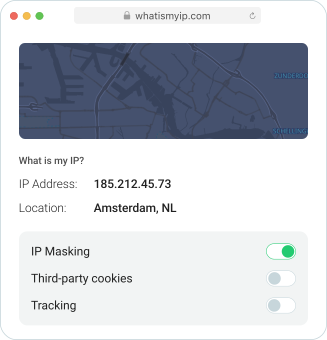
Websites see the ApexGuard server IP address instead of your real IP.
WebRTC Exposure
Helps reduce WebRTC-related IP exposure that can reveal local or real network details inside the browser.
Location Control
Change your visible browser location directly from Chrome, Firefox, or Edge.
Public Wi-Fi Browsing
Adds a privacy layer when browsing on cafés, airports, hotels, campuses, and coworking networks.
Full-Device Coverage
Use the ApexGuard VPN app when you want protection across apps, downloads, messaging tools, and background traffic.

WebRTC Leak Prevention

WebRTC can help browsers support real-time features such as voice, video, and peer-to-peer connections. In some cases, it may also expose network details that reduce the privacy users expect from a VPN or proxy extension.

ApexGuard browser extensions help reduce WebRTC-related IP exposure, keeping browser privacy protections aligned with your ApexGuard session while you browse, stream, shop, work, or connect on shared networks.

Key benefits:

  • Helps reduce browser-based IP exposure
  • Supports stronger privacy while using Chrome, Firefox, or Edge
  • Works alongside ApexGuard’s browser-level IP masking
  • Adds extra protection for public Wi-Fi and shared networks
Effortless Browsing Experience

A better browsing experience starts when privacy, access, and usability work together. ApexGuard Proxy Extensions are built to give you simple browser-level protection backed by a trusted privacy foundation.

Lightweight Protection

Mask your IP address and route your browser traffic through ApexGuard for a more private browsing experience.

Fast, Stable Performance

Browse, shop, stream, and work online with stable performance supported by ApexGuard’s high-capacity global infrastructure.

One Account Across Devices

Use ApexGuard across desktop, mobile, and browser platforms under one account, with unlimited devices included.

Built-In VPN Security Features

ApexGuard browser extensions help protect the browsing activities that define modern online life. Whether you are shopping online, checking accounts, researching, streaming in your browser, working from a café, or using hotel Wi-Fi, ApexGuard gives your browser a stronger privacy layer without adding friction.

  • Browser-level IP masking
  • WebRTC privacy protection
  • Secure browsing on shared networks
  • Fast location switching from your browser
  • Lightweight protection for Chrome, Firefox, and Edge
  • Privacy simple enough for everyday use

Why Use the ApexGuard Browser Extension?

A browser extension is ideal when you want quick, simple privacy protection directly inside your browser. It helps protect browser traffic, mask your visible IP address, and give you more control over how websites see your connection.

Fits Every Way You Browse

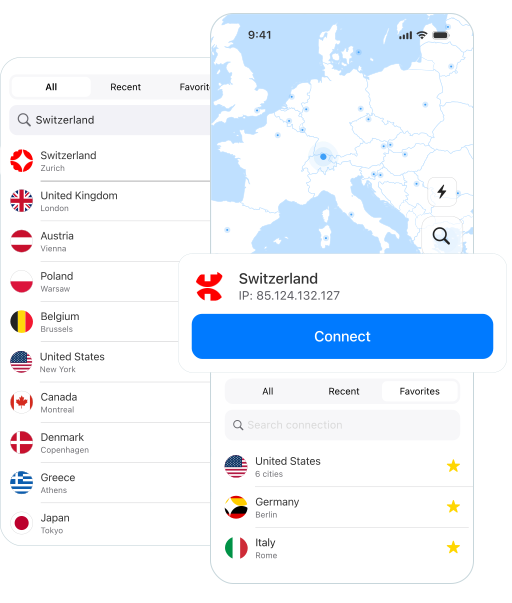
Change location, connect, or disconnect directly from the browser without opening a full desktop app.

Fits Every Way You Browse

Change location, connect, or disconnect directly from the browser without opening a full desktop app.

  • General Browsing

    Browse, search, read, shop, and use online services with a more private browser session.

  • Public Wi-Fi

    Add protection when using cafés, airports, hotels, campuses, coworking spaces, and other shared networks.

  • Travel and Regional Access

    Connect through server locations across 120+ countries for more flexible browsing while traveling or using international services.

Browser Extension vs VPN App

ApexGuard browser extensions protect supported browser activity, while the full ApexGuard VPN app provides broader device-level protection across apps, background services, downloads, and other internet traffic.

Browser Extension

Fast browser privacy, IP masking, WebRTC privacy protection, quick location switching, public Wi-Fi browsing, shopping, streaming, and research

VPN App

Full-device privacy across browsers, apps, downloads, messaging tools, cloud services, and background connections

Certified Security Standards

ApexGuard is built in Switzerland with privacy-first operations and trust-led data handling. The service is designed to protect your browsing without turning your activity into a stored record.

Swiss Privacy Standards

ApexGuard operates on Swiss privacy principles with FADP-aligned data handling, establishing a robust legal and operational framework for user information protection.

Strict No-Logs Architecture

Browsing history and IP activity logs are not retained, ensuring online activity is not kept as a routine record behind the service.

Apex-Owned Infrastructure

ApexGuard operates privately managed VPN infrastructure to support tighter control over security, privacy, and network performance while reducing unnecessary third-party exposure.

ISO 27001-Aligned Security Controls

Active ISO 27001-aligned controls support disciplined platform operations, access management, risk oversight, and continuous improvement.

PCI DSS-Aligned Security Environment

Sensitive data is handled in a PCI DSS-aligned security environment, supporting stronger protection across platform operations.

ApexGuard vs Free Proxy Tools

Feature Breakdown

Free or basic proxy tools may change how your location appears online, but privacy depends on more than IP masking. ApexGuard is built to give you stronger trust, clearer data handling, and more dependable performance across the browsers and devices you use every day.

Free or basic proxy tools may change how your location appears online, but privacy depends on more than IP masking. ApexGuard is built to give you stronger trust, clearer data handling, and more dependable performance across the browsers and devices you use every day.

Download Apex

ApexGuard

  • Swiss Standards

    Built around Swiss privacy principles and responsible data handling.

  • No Logs

    Designed not to retain browsing history or IP activity logs.

  • Proprietary Network

    Runs on Apex-owned infrastructure to reduce third-party exposure.

  • Global Access

    Connect through servers across 120+ countries.

  • Unlimited Devices

    Use one account across desktop, mobile, and browser platforms.

  • Certified Security

    Backed by ISO 27001 controls and PCI DSS-aligned data handling.

Free Proxy Tools

  • Unclear Practices

    Data handling may be inconsistent, or difficult to verify.

  • Policy Gaps

    Activity and retention policies are limited.

  • Third-Party Reliance

    Infrastructure may depend on external or less transparent providers.

  • Restricted Network

    Fewer locations may lead to congestion or reduced availability.

  • Usage Limits

    Device, bandwidth, or session restrictions may apply.

  • Basic Safeguards

    Little visibility into security practices or data handling.

You May Still Be Wondering

Frequently Asked Questions

Frequently Asked Questions FAQ
How to get Apex How to install
System requirements Requirements

What is the ApexGuard Proxy Extension?

The ApexGuard Proxy Extension is a browser extension for Chrome, Firefox, and Edge. It helps protect supported browser activity, mask your IP address, reduce visible IP exposure, and give you quick privacy control directly inside your browser.

Which browsers does ApexGuard support?

ApexGuard supports browser extensions for Google Chrome, Mozilla Firefox, and Microsoft Edge.

Is the browser extension the same as the VPN app?

No. The browser extension protects browser-level traffic, while the full ApexGuard VPN app provides broader device-level protection across apps, downloads, messaging tools, cloud services, and background connections.

What is WebRTC protection?

WebRTC is a browser technology used for real-time features such as voice, video, and peer-to-peer connections. ApexGuard browser extensions help reduce WebRTC-related IP exposure that can reveal browser-level network details.

Can I use ApexGuard browser extensions on public Wi-Fi?

Yes. ApexGuard browser extensions add a privacy layer when browsing on cafés, airports, hotels, campuses, libraries, coworking spaces, and other shared networks.

Is ApexGuard different from a free proxy extension?

Yes. Free proxy tools may only change how your location appears online. ApexGuard combines browser-level privacy with Swiss privacy standards, strict no-logs architecture, Apex-owned infrastructure, WebRTC privacy protection, and unlimited-device coverage.

Does ApexGuard keep logs of my browsing?

No. ApexGuard is built around strict no-logs architecture and is designed not to retain browsing history or IP activity logs.

How many devices can I use with ApexGuard?

ApexGuard allows unlimited devices under one account across desktop, mobile, and browser platforms.

Where should I download the ApexGuard extension?

Download ApexGuard only from the official ApexGuard website or trusted browser extension stores for Chrome, Firefox, and Edge.

Step 1

Download Apex VPN

Get Apex for Windows, macOS, Linux, or get it from App Store or Google Play.

Step 2

Install the app

Launch the installer file and follow the on-screen instructions.

Step 3

Enjoy your online privacy

Open Apex VPN, log in or sign up, and connect to your desired server.

Apexguard System Requirements by Platform

ApexGuard delivers refined privacy across modern devices without demanding high-end hardware, keeping protection accessible, seamless, and consistent every day.

Desktop devices:

MacOS:

OS Version:

macOS 13.5 Ventura or newer

Device:

Mac Mini, Mac Studio, Mac Pro, iMac, MacBook Air, and MacBook Pro

Disk Space:

~40 MB

Architecture:

Intel x86_64 or Apple Silicon (universal)

Windows:

OS Version:

Windows 10 (64-bit, version 1607 and later) and Windows 11

RAM:

At least 1 GB

Disk Space:

~60 MB

Architecture:

64-bit

Linux:

Supported Distros:

Debian, Ubuntu, and Fedora

RAM:

At least 1 GB

Disk Space:

~40 MB

Architecture:

64-bit

Additional:

libglib2.0, libgtk-3, and curl installed

Mobile devices:

iOS:

OS Version:

iOS 15.6 or newer

Device:

iPhone, iPad, or iPod Touch 7th gen

Disk Space:

~50 MB

Other:

Internet connection required for full functionality

Android:

OS Version:

Android 9.0 or newer

Device:

Smartphone or tablet

Disk Space:

~50 MB

Other:

Network access, storage (for config/cache)

Add ApexGuard to Your Browser

Browse with stronger privacy, fast location control, and lightweight protection built for Chrome, Firefox, and Edge. ApexGuard browser extensions help mask your IP address, reduce WebRTC-related exposure, and protect your browser session with Swiss privacy standards, strict no-logs architecture, Apex-owned infrastructure, and fast global performance.

Get Started
30-day risk-free money-back guarantee